Jelly Bean Font: A Crafter’s Guide to Cute Typography
As a maker who spends hours perfecting the details of handmade goods, I know that typography is often the unsung hero of great design. Whether you are creating custom wedding invitations, designing labels for your small-batch candle business, or crafting digital printables for Etsy, the right typeface can elevate your product from amateur to professional. This is where Jelly Bean comes into play. It is not just another font; it is a versatile design tool that bridges the gap between playful charm and clean readability.
Developed by Script Amp, Jelly Bean is a unique offering in the world of commercial fonts. It stands out because it includes two distinct styles: a whimsical, hand-lettered script and a complementary sans serif version. For crafters and small shop owners, this duality is invaluable. You do not need to hunt for a second font to pair with your main title; the harmony is built-in. Let us explore how this creative font can transform your physical products, digital downloads, and brand identity.
The Visual Personality of Jelly Bean
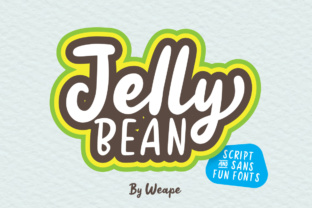
When you first look at Jelly Bean, the immediate impression is one of joy and approachability. The script version features organic, flowing strokes that mimic natural handwriting. It has a bouncy baseline and rounded terminals, giving it a soft, friendly appearance. This makes it an ideal choice for brands that want to convey warmth, nostalgia, or a touch of whimsy. Unlike stiff, formal serif fonts, Jelly Bean feels personal, as if it were written specifically for the customer.
The accompanying sans serif style is equally important. It is clean, modern, and highly legible, providing a perfect counterbalance to the expressive script. This combination allows you to create a cohesive visual hierarchy without the guesswork of font pairing. In the context of modern typography, having a matched set ensures that your design assets remain consistent across various mediums, from social media graphics to packaging design.
Practical Applications for Handmade Sellers
For those of us running handmade businesses, versatility is key. We need fonts that work on diverse materials and scales. Jelly Bean excels in several specific areas of product creation:
- Product Labels and Packaging: If you sell homemade jams, soaps, or baked goods, Jelly Bean is perfect for labeling. The script font works beautifully for the product name, such as "Lavender Honey," while the sans serif can handle the weight, ingredients, or net weight information. This ensures your label is both attractive and compliant with readability standards.
- Wedding and Event Stationery: Wedding welcome boards, place cards, and invitation suites benefit greatly from the romantic yet fresh feel of this typeface. It strikes a balance between elegance and fun, making it suitable for rustic, boho, or modern minimalist weddings.
- Digital Printables and Planners: For creators selling digital downloads, Jelly Bean adds a human touch to printable wall art, planner headers, and greeting cards. Its clarity ensures that even when printed at home by customers, the text remains sharp and inviting.
- Seasonal Crafts and Signs: Whether you are using a Cricut or Silhouette machine to cut vinyl for farmhouse signs or holiday decorations, the bold strokes of Jelly Bean hold up well. It is particularly effective for short phrases like "Hello Fall" or "Sweet Home."
Readability and Technical Considerations
One of the biggest challenges crafters face is ensuring that decorative fonts remain readable. Jelly Bean addresses this through its thoughtful design. However, there are best practices to keep in mind when using this display font for commercial projects.
For small stickers or tiny product tags, avoid using the script version for essential information. Instead, reserve the script for titles or decorative elements and use the sans serif version for any text that needs to be read quickly, such as pricing or instructions. When cutting vinyl, ensure your design software is set to the correct complexity level. The smooth curves of Jelly Bean generally cut cleanly, but always perform a test cut on scrap material to adjust pressure and speed settings.
If you are creating SVG-style designs for t-shirts or tote bags, consider the spacing. Hand-lettered fonts often have unique kerning. You may need to manually adjust the tracking between letters to ensure the word looks balanced, especially when scaling the design up for large format prints like banners or wall decals.
Creating Cohesive Brand Identity
Consistency builds trust. When customers recognize your font choices across your Instagram posts, your website, and your physical packaging, it strengthens your brand identity. Jelly Bean serves as an excellent anchor for a brand that wants to appear friendly, creative, and high-quality. Because it is a premium font from Script Amp, you are less likely to encounter the common issues found in free fonts, such as missing characters or inconsistent stroke weights.
Using the two styles together creates a "fresh design" aesthetic that feels curated rather than cobbled together. For example, a boutique clothing tag might feature the brand name in the flowing script, with the size and care instructions in the clean sans serif. This juxtaposition signals attention to detail and professional presentation, which can justify higher price points for your handmade items.
Tips for Maximum Impact
To get the most out of Jelly Bean, experiment with color and layout. The font’s playful nature pairs well with pastel palettes for baby showers or bright, bold colors for birthday parties. Do not be afraid to layer the text over textures, such as kraft paper backgrounds or watercolor splashes, to enhance the handmade feel.
Additionally, check the included file formats. Most premium fonts come in OTF and TTF formats, which are compatible with major design software like Adobe Illustrator, Photoshop, Canva, and Procreate. If you are working on web design or social media graphics, these formats ensure that your text renders correctly across different platforms.
Remember to review the licensing agreement provided by Script Amp. As a commercial font, Jelly Bean typically allows you to use it for creating physical products for sale, such as mugs, shirts, and printed invitations. However, rules regarding embedding the font in digital templates or redistributing the font file itself vary. Always clarify these terms to protect your business and respect the designer’s work.
In conclusion, Jelly Bean is more than just a cute typeface; it is a practical solution for crafters who need reliability and style. By combining the expressive script with the functional sans serif, you can create designs that are not only visually appealing but also effective in communicating your message. Whether you are a seasoned designer or a hobbyist just starting your Etsy journey, adding Jelly Bean to your toolkit can help you produce work that stands out in a crowded market.